
Deploy your Spring Boot application to production

Javier de la Puente
on 13 January 2026
Tags: charm , Charms , cloud , Juju , juju charms , kubernetes
In a previous article, we covered how easy it is to create Spring Boot containers with Rockcraft. So the next logical step is to deploy and operate your application in a production environment. The Juju ecosystem is the key to making this process straightforward.
In this article we walk through the steps required to deploy a Spring Boot application to production using Juju and Kubernetes. The goal is to showcase the integration of the application with essential services like PostgreSQL for database management and Traefik for ingress control.
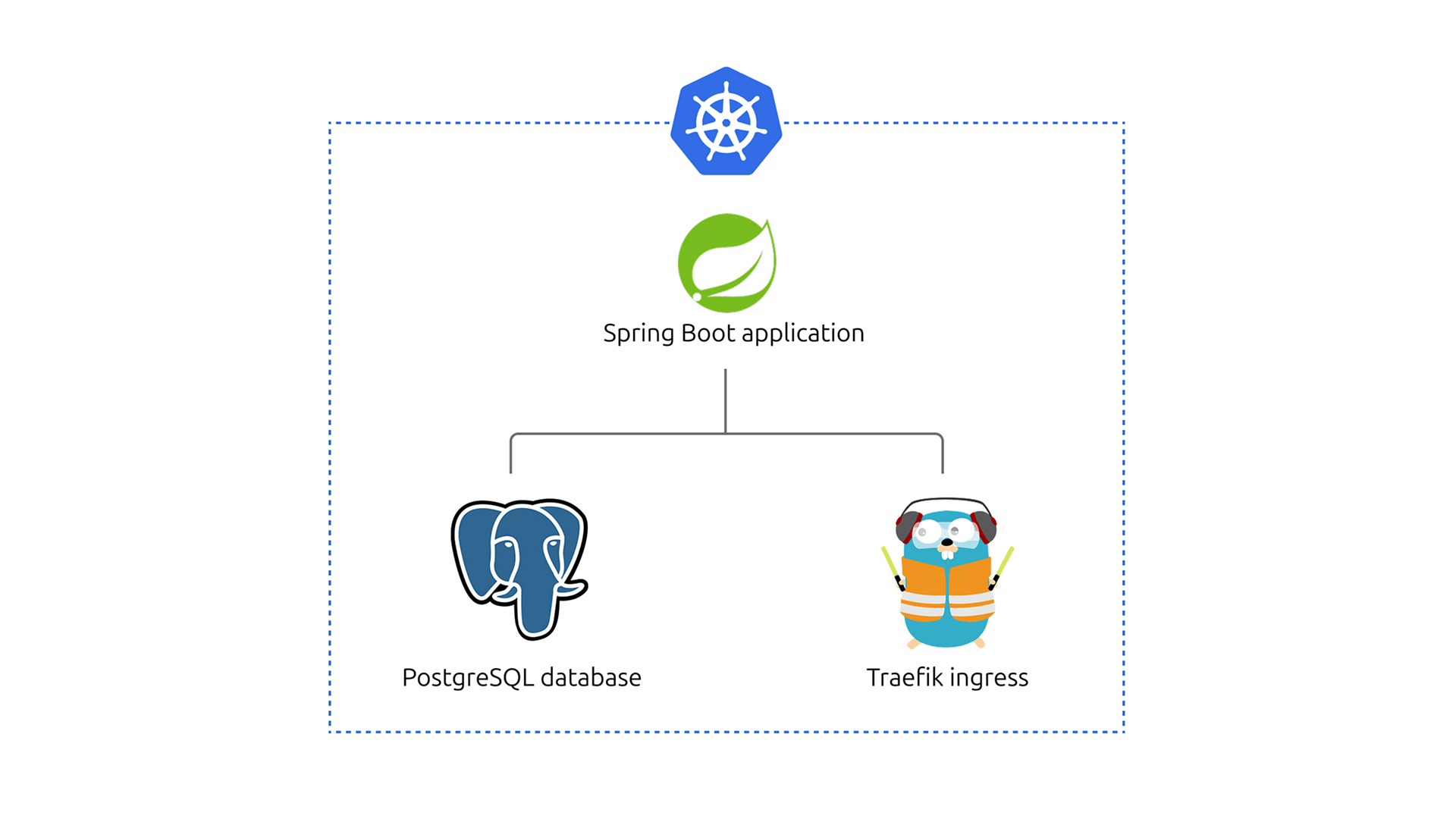
Ordinarily, deploying and operating Spring Boot containers is easier said than done. Any non-trivial application will require integrations with other software components like databases, message brokers, and authentication services. Some of these components are complex to operate. What’s more, your application will need to be exposed to the outside world. And for Day 2 operations, you’ll also need to perform routine maintenance and properly monitor your application.
Fortunately, Juju provides a strong ecosystem composed of a multitude of high quality software operators that enables deployment, integration and lifecycle management at any scale, on any infrastructure.
With the release of the Spring Boot framework extensions for Rockcraft and Charmcraft, if your application follows the 12-factor methodology best practices, you can benefit from the Juju ecosystem out of the box.
If you are developing a Spring Boot application we recommend you to try out the devpack support for Spring and then follow this tutorial to write your Spring Boot charm.
But without further ado, let’s see how it all works by charming spring-petclinic.
Set up a developer machine with Canonical Kubernetes and Juju
We will start with a virtual machine created from scratch using Multipass and prepare our development machine with the help of the Concierge tool.
Launch the new virtual machine and shell into it:
multipass launch --cpus 4 --disk 30G --memory 4G --name blogpost 24.04
multipass shell blogpost
We will provision the testing machine with Concierge, which will install and configure Rockcraft, Charmcraft, Canonical Kubernetes and Juju. Besides that, we will update the load balancer to serve under the machine’s main IP and install an OCI image registry:
sudo snap install --classic conciergesudo concierge prepare -p k8s --charmcraft-channel latest/edgePREFSRC=$(ip -4 -j route get 2.2.2.2 | jq -r '.[] | .prefsrc')sudo k8s set load-balancer.cidrs=$PREFSRC/32curl https://raw.githubusercontent.com/canonical/spring-petclinic/refs/heads/resources/registry.yaml | kubectl apply -f -
Get spring-petclinic application
spring-petclinic is the app we’ll be charming. It’s a sample application created by the Spring team to demonstrate a real-world web app using the Spring Framework.
Clone the spring-petclinic repository.
git clone https://github.com/canonical/spring-petclinic.git
cd spring-petclinic
Following the spring-petclinic repository instructions, you can build a jar and run it with the command line. It is quite easy, but clearly not production ready, even the database in-memory.
Create the rock
Let’s prepare a rock – a compliant OCI image – for the application. We could use either Maven or Gradle to build the application, but for this example we will use Maven. From the spring-petclinic directory, remove the Gradle artifacts and initialize the rockcraft project:
rm -rf build.gradle gradlew gradlerockcraft init --profile spring-boot-framework
Pack the rock and upload it to the OCI registry :
ROCKCRAFT_ENABLE_EXPERIMENTAL_EXTENSIONS=True rockcraft packrockcraft.skopeo copy --insecure-policy --dest-tls-verify=false oci-archive:spring-petclinic_0.1_amd64.rock docker://localhost:32000/spring-petclinic:0.1
At this point we have a fully compliant OCI image. But to fully integrate with the Juju ecosystem we need a charm, a software operator.
Create the charm
Let’s build it:
mkdir charmcd charmcharmcraft init --profile spring-boot-framework --name spring-petclinic
As we want to use PostgreSQL instead of an in-memory database, add the following lines to the file charmcraft.yaml:
requires:
  postgresql:
    interface: postgresql_client
    optional: false
    limit: 1
And we are ready to create a charm. Pack it:
CHARMCRAFT_ENABLE_EXPERIMENTAL_EXTENSIONS=True charmcraft packLet’s test it
At this point we have a charm for spring-petclinic that will integrate seamlessly with PostgreSQL.
Let’s test it with a new Juju model in a Kubernetes cloud:
juju add-model spring-petclinicjuju deploy ./spring-petclinic_amd64.charm spring-petclinic --resource app-image=localhost:32000/spring-petclinic:0.1 --config app-profiles=postgres
Deploy PostgreSQL and Traefik and integrate with spring-petclinic:
juju deploy postgresql-k8s --trustjuju integrate spring-petclinic postgresql-k8sjuju deploy traefik-k8s --trustjuju integrate spring-petclinic traefik-k8sAfter a while, your production ready application will be ready for use! You can check it with the command juju status:
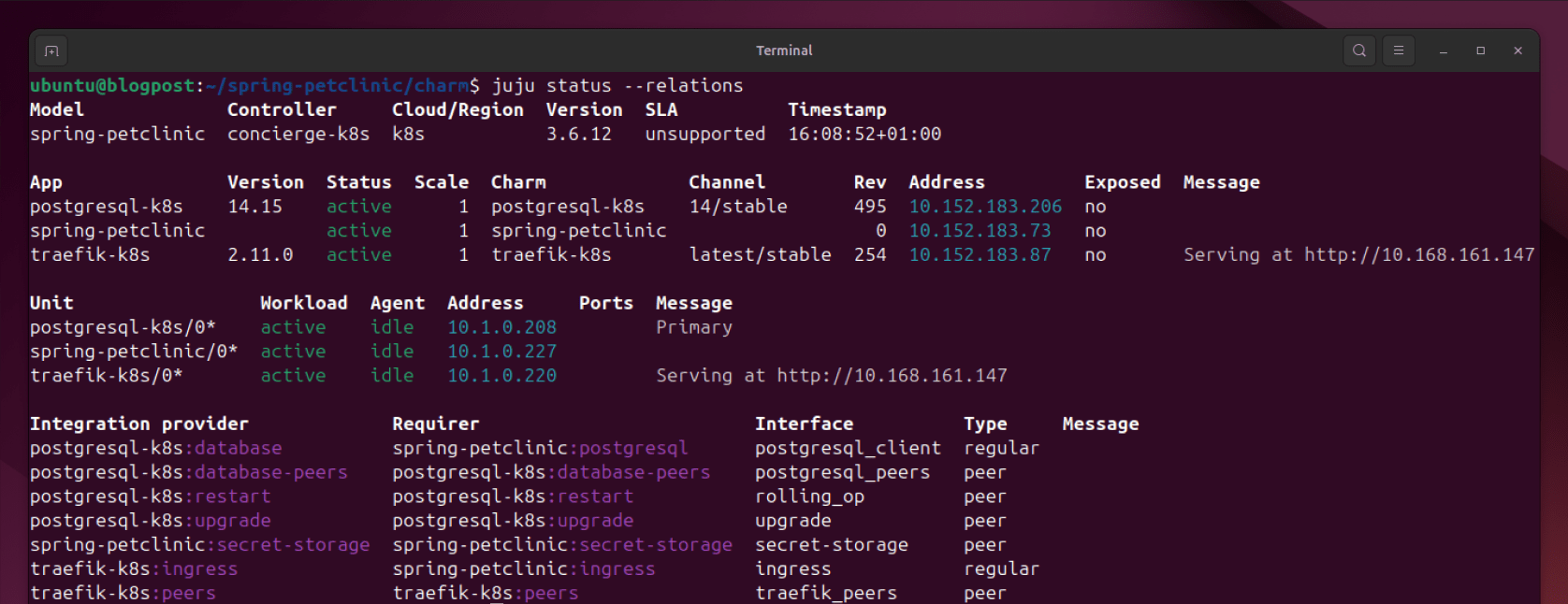
You can get the URL of the application with:
juju run traefik-k8s/0 show-proxied-endpointsAnd just like that, you can use it!

The application is running in a Kubernetes cluster, with Trafik acting as an ingress. Your spring-petclinic application is now using PostgreSQL to store its data. The Charmed PostgreSQL K8s has provided credentials for the database to the spring-petclinic application, and is ready to be operated in a production-grade environment.
Not bad for a start.
Get in touch
Do you have a project or setup where you want to employ this solution? If you have any questions about the 12-factor tooling for Rockcraft and Charmcraft, reach out in our Matrix Channel.
What’s next?

What is Kubernetes?
Kubernetes, or K8s for short, is an open source platform pioneered by Google, which started as a simple container orchestration tool but has grown into a platform for deploying, monitoring and managing apps and services across clouds.
Kubernetes made easy
Everything you love about the upstream, with enterprise-grade assurance. Canonical Kubernetes offers hassle-free installation and maintenance, and peace of mind for your containerized workloads. Maximize performance and deliver security updates across any cloud.
Newsletter signup
Related posts
The hitchhiker’s guide to infrastructure modernization
One of my favourite authors, Douglas Adams, once said that “we are stuck with technology when what we really want is just stuff that works.” Whilst Adams is...
Building new revenue streams: 3 strategic cloud opportunities for telcos in 2026
PWC claimed the ‘fundamental challenge’ behind slowing growth is that telecom’s ‘core products and services’ are ‘becoming commodities.’ The way forward lies...
Harnessing the potential of 5G with Kubernetes: a cloud-native telco transformation perspective
Telecommunications networks are undergoing a cloud-native revolution. 5G promises ultra-fast connectivity and real-time services, but achieving those benefits...